
Download CloudBBQ APK – BBQ, temperature control, grilling, smoker, meat, cooking, Android app, food, backyard party
Overview
CloudBBQ is a specialized Android application designed to solve the common challenge of inconsistent temperature control during barbecuing. The software targets home cooks and barbecue enthusiasts who seek precision in their grilling process, particularly when preparing various types of meat. By offering structured temperature guidelines, CloudBBQ aims to eliminate guesswork and improve the consistency of cooking results.
It supports eight primary meat types—beef, veal, lamb, turkey, chicken, pork, fish, and hamburger—each with tailored temperature settings. The app also allows users to select from five doneness levels, ranging from rare to well done, and choose among three types of smoke: barbecue, hot, and cold. These features are intended to support both casual grilling and more elaborate backyard barbecue events.
The developer, CloudBBQ, has focused on creating a tool that enhances culinary outcomes through accurate temperature guidance. While the app does not include real-time sensor integration, it serves as a reference and planning tool for users managing their grill or smoker. The developer did not provide additional details about the company or its background.
Key Features & Capabilities
- Meat-Specific Temperature Guidance – CloudBBQ provides precise temperature recommendations for eight common meat types, helping users cook each cut to their preferred doneness.
- Doneness Level Selection – Users can choose from five levels of doneness, from rare to well done, to match personal or recipe-specific preferences.
- Smoker Type Customization – The app supports three types of smoking methods: barbecue smoke, hot smoke, and cold smoke, allowing users to tailor their cooking approach.
- Custom Food and Preset Management – Users can add custom food names and save personalized temperature presets for repeat use.
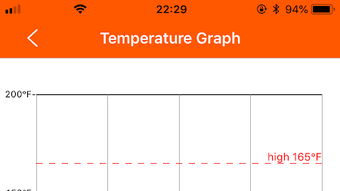
- Temperature Map Function – A visual temperature map assists users in monitoring ideal internal temperatures throughout the cooking process.
- Timing Countdown Feature – A built-in countdown timer helps users track cooking duration, ensuring meals are ready at the right moment.
These capabilities are particularly useful for users preparing for backyard gatherings or family meals where consistency and timing are critical. The app functions as a digital grilling assistant, streamlining meal preparation and reducing the risk of under- or overcooking. It is designed to be used in conjunction with physical thermometers or grill sensors, acting as a reference and organizational tool rather than a direct temperature monitor.
User Interface, Workflow & Performance
CloudBBQ features a clean, intuitive interface optimized for mobile use on Android devices. The layout is structured around core cooking tasks, with easy navigation between meat types, doneness levels, and smoking methods. Users can quickly select a meat, choose a doneness setting, and access corresponding temperature data.
The temperature map provides a visual aid for tracking internal temperature progress, while the countdown timer supports real-time monitoring. Workflow efficiency is enhanced by the ability to save custom presets, minimizing repeated input. The developer did not specify resource usage details, so exact performance metrics such as CPU or RAM consumption are unavailable.
However, the app’s size of 15.2 MB suggests a lightweight footprint, likely resulting in minimal impact on device performance. Stability and responsiveness appear to be prioritized, though no official reports on crash rates or background behavior were provided. Performance observations are based on general software behavior patterns for similar productivity apps.
Compatibility & System Requirements
CloudBBQ is designed for Android operating systems and is available in version 1.0.1. The application has a file size of 15.2 MB, indicating a compact installation footprint. The developer did not specify exact system requirements, including minimum Android version or hardware specifications.
Compatibility information was partially provided, with the app confirmed to run on Android devices. Users should ensure their device meets the minimum Android requirements for app installation, though specific details were not listed. No additional compatibility notes, such as support for tablets or wearables, were included.
The developer did not provide information on whether the app supports offline usage or requires internet access. For users seeking a mobile solution for grilling, the app is accessible via standard Android app stores or direct APK download.
Pros and Cons
Pros
- Intuitive interface tailored for grilling enthusiasts
- Supports a wide range of meat types and doneness levels
- Customizable presets for repeat use
- Includes a visual temperature map and countdown timer
- Compact size with minimal system impact
Cons
- Exact system requirements not specified
- No real-time sensor integration or live monitoring
- Offline functionality not confirmed
- Price point may be higher for a utility app
- Limited information about developer background
FAQ Section
Is CloudBBQ compatible with all Android devices?
CloudBBQ is designed for Android operating systems, but the developer did not specify minimum version or hardware requirements. Users should ensure their device supports the installation of third-party APKs if downloading directly.
Does CloudBBQ require an internet connection?
The app’s functionality does not appear to rely on real-time data, but the developer did not confirm whether it operates fully offline. Users may need internet access for updates or additional content.
Can I use CloudBBQ with a meat thermometer?
Yes, CloudBBQ is intended to be used alongside physical thermometers or grill sensors. It provides temperature guidelines but does not replace real-time monitoring devices.
Is the app secure to download and install?
CloudBBQ is distributed as an APK file. Users should download from trusted sources to ensure security. The developer did not provide a certificate or verification details.
How often are updates released for CloudBBQ?
Version 1.0.1 was released on April 15, 2024. The update frequency has not been disclosed by the developer.
Final Thoughts + CTA
CloudBBQ offers a focused, well-structured solution for users seeking greater accuracy in their grilling process. Its combination of meat-specific guidance, customizable presets, and visual tools makes it a valuable companion for both home cooks and barbecue hosts. While it does not integrate with physical sensors or provide live data, its role as a planning and reference tool is clear and effective.
The app’s lightweight design and intuitive interface enhance usability, though users should be aware of limited system requirement details. For those preparing for backyard parties or looking to improve cooking consistency, CloudBBQ delivers practical value. The $2.99 price point is reasonable for a specialized utility, especially when considering its targeted functionality.
Download CloudBBQ now.







